Data Analyst vs Business Analyst: Difference Explained
Sep 12, 2026

Choosing a career can feel difficult when comparing Data Analyst vs Business Analyst, as both roles involve problem-solving, decision-making and working with business information. In reality, their day-to-day responsibilities can be quite different. For students, fresh graduates, job seekers and working professionals planning a career change, understanding these differences early can help them choose the right learning path and build relevant skills.
Choosing the right path starts with understanding the type of work you like to do and the skills you want to build. When comparing Data Analyst and Business Analyst, look at how comfortable you are with numbers, tools, communication and problem-solving. Data-focused roles often suit learners who enjoy reports, dashboards, SQL and working with measurable information.
Business-focused roles may be a better fit for people who specialize in understanding requirements, improving processes and working with different teams. Your long-term career goals also play a role. Think about whether you prefer technical work, business discussions or a mix of both before choosing a learning path that matches your interests and job plans.
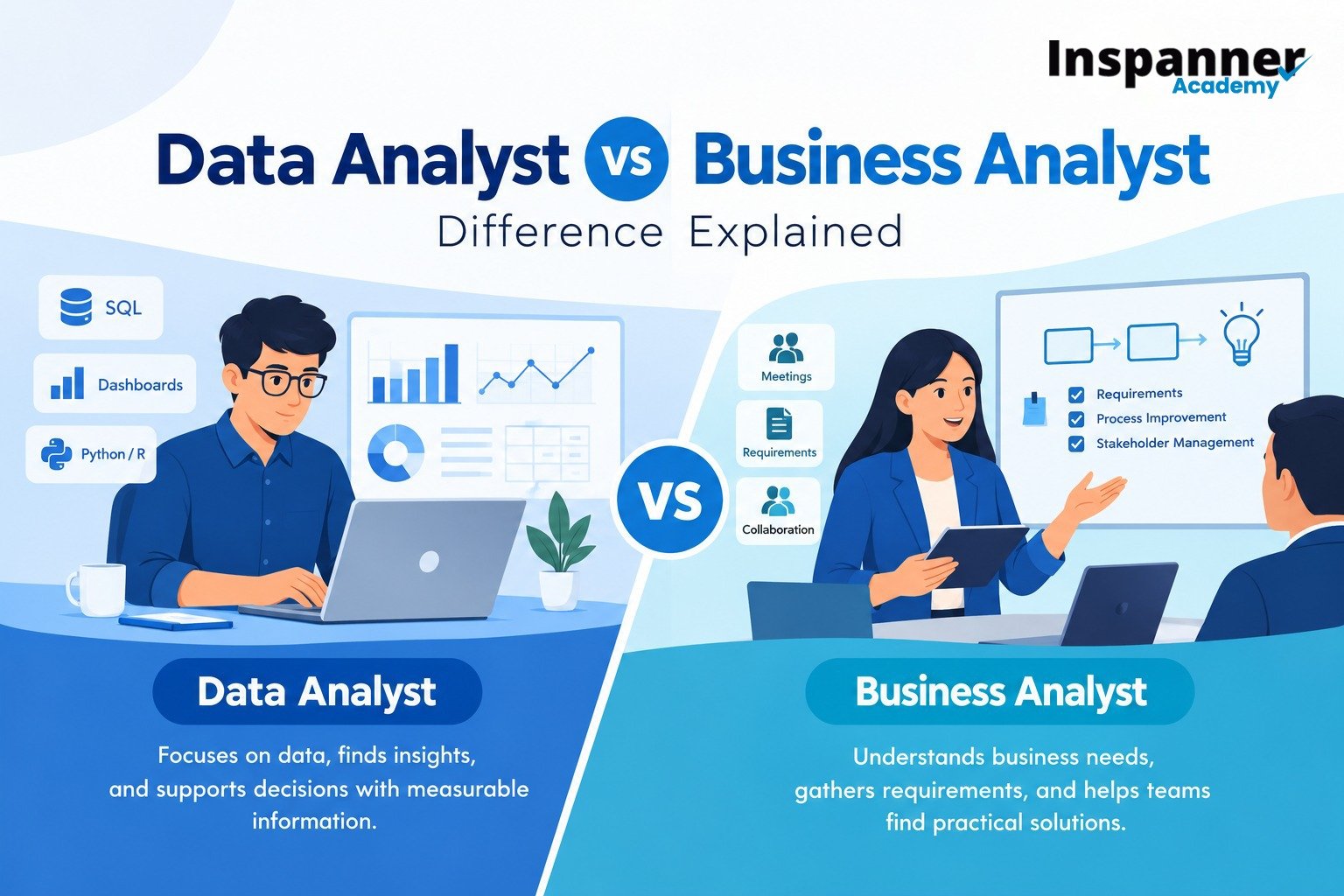
Both roles help companies make better decisions, but they approach a problem from different directions. One studies measurable information, while the other focuses more on business needs, processes and practical solutions.
Main Focus: A data analyst studies datasets to find patterns, trends, gaps and useful insights that support decisions.
Business Focus: A business analyst identifies business needs, gathers requirements and helps teams define suitable solutions.
Daily Work: Data-focused jobs often involve SQL, spreadsheets, dashboards, reports and checking information for accuracy.
Stakeholder Work: Business-focused jobs may include meetings, process mapping, requirement documents and discussions with users and technical teams.
Technical Depth: Data roles usually need stronger knowledge of databases, statistics, visualization and sometimes Python or R.
Communication: Business-facing roles often require clear communication with managers, customers, developers and other teams.
Typical Output: One role may produce dashboards and insights, while the other may prepare process flows, requirements and improvement plans.
Understanding the difference matters because job titles do not always tell you what the work will involve. Some companies expect reporting professionals to understand business goals, while others want requirement-focused professionals who know SQL or Power BI. Before applying for a role, read the job description carefully. Compare the daily tasks, tools and expected outcomes with your strengths, interests and learning plans.
The data analyst vs business analyst salary, career path and future opportunities can differ based on skills, experience, industry and job responsibilities. The table below gives a practical comparison for students, job seekers and career switchers.
The skills comparison becomes clearer when you look at what employers may expect from a beginner. Both paths need problem-solving, communication and business awareness, but the balance between technical work and stakeholder work is different.
A learner interested in data analytics becomes comfortable with Excel, SQL, charts, basic statistics and tools such as Power BI or Tableau. Python can become useful as the work grows more advanced. Important data analyst skills also include cleaning information, checking accuracy, selecting useful metrics and explaining findings in simple terms. These abilities support practical data analysis across sales, finance, marketing, operations and other teams.
Someone interested in business analytics may spend more time understanding requirements, workflows, customer needs and business goals. Useful business analyst skills include requirement gathering, process mapping, documentation, stakeholder communication, critical thinking and basic knowledge of software projects. Familiarity with Excel, SQL, dashboards, Jira or similar tools can also help when a role connects business analysis with technology teams.
If you are asking which is better, data analyst or business analyst, start with the type of work you want to do every day. The better fit depends on your strengths, technical comfort, communication style and the direction in which you want to grow.
Choose a Data-Focused Path If: You enjoy numbers, SQL, spreadsheets, charts, patterns and working directly with structured information.
Choose a business-focused path if: You have discussions, requirements, process improvement, documentation and working with different teams.
Consider Your Technical Comfort: If databases, coding and reporting tools interest you, the more technical path may suit you.
Think About Communication: If you enjoy explaining needs and connecting users with technical teams, a business-facing role may fit better.
Look at Future Learning: Choose a path that gives you room to build deeper skills instead of following a job title only because it is popular.
Check Real Openings: Compare current job descriptions before deciding between data analyst and business analyst roles because duties can vary across companies.
Build Practical Proof: Small projects, dashboards, reports, process maps and case studies can help show what you know during job applications.
Yes, moving between these paths is possible because they share problem-solving, communication and business thinking. A reporting professional can learn requirement gathering, process mapping and stakeholder management. A business-focused professional can learn SQL, visualization, statistics and database basics.
This overlap can be especially useful for career switchers who want to build a broader mix of technical and business skills. It can also help them explore different roles over time instead of being limited to only one type of work.
Students and career switchers should focus on practical learning rather than collecting tools without a clear purpose. Start with the skills used in your target job, complete small projects and practise explaining what you did and why. Review entry-level job descriptions regularly so you understand which tools and business abilities employers are asking for.
Inspanner Academy offers structured learning options for students, fresh graduates, job seekers and working professionals who want to build practical skills in analytics and related technologies. With AI-integrated software training in Hyderabad, learners can explore industry-relevant tools, work on practical concepts, strengthen technical knowledge and prepare for roles that match their career interests and upskilling goals.
The Data Analyst vs Business Analyst choice becomes easier when you compare the actual work instead of focusing only on titles or salary. One path is more connected to datasets, SQL, reporting, visualization and measurable insights. The other is more connected to requirements, processes, stakeholders and business solutions. Both can offer useful directions when your learning matches the work you want to do.
Before choosing a course, review job descriptions, understand the tools expected in your preferred role and think about the tasks you would enjoy doing regularly. Inspanner Academy can be part of your research if you want structured training for analytics and related software careers. Choose a learning path that helps you practise relevant skills, build projects and prepare for the type of role you want to pursue.
Yes, graduates from commerce, arts, management or other backgrounds can enter either field by building the required technical or business skills. Practical learning, projects and a clear understanding of the role can support the transition.
The learning period depends on your existing knowledge, chosen role and time spent practising. Beginners should focus on core skills, hands-on projects and regular practice rather than completing tools within a fixed number of months.
An internship can provide useful workplace exposure, but it is not the only way to show your skills. Freshers can also use academic projects, personal case studies, dashboards, reports or process documents to demonstrate practical knowledge.
A beginner portfolio should show how you approach a real problem and explain your findings clearly. Depending on the role, it may include Excel or SQL projects, dashboards, data reports, requirement documents, process maps or business case studies.
Excel is often a practical starting point for understanding data, formulas and basic reporting, followed by SQL for working with databases. Power BI can then help you turn analysed information into clear dashboards and visual reports.

.png)

